Подтвердит, что вы прошли курс и дополнит ваше резюме
Купить с сертификатомCourse on creating 3D characters 2022 + selling on NFT marketplaces
онлайн курс
Course on creating 3D characters 2022 + selling on NFT marketplaces
Смотреть
видео
онлайн курс
You will masterAutodesk Maya software for 3D modeling, learn to create lively and memorable charactersfor sale on NFT marketplacesand 3D stocks.An example of our robot atNFT marketplace via link
Build a job search portfolio and earn a certification to become a sought-after professional in a high-paying industry.If you have any questions, teacherwill answer themand will show your desktop.
 Кому подойдет курс
for beginners
future specialists in motion design
for beginner 3D modelers
those wishing to sell their works as crypto NFTs
those wishing to promote their work in the Metaverses decentraland.org and sandbox.game
gameDev specialists
graphic and web designers
 Чему вы обучаетесь на курсе
creating a 3D character for your portfolio
polygonal modeling
texturing
basics of rigging and skinning
animation
render
selling the model as an NFT
Описание курса
In our course we will learn how to workAutodesk MAYA- program for3D-animation, modeling and visualization in the fieldfilm production, television and creationgames.The program has modeling, visualization and texturing tools.This is a serious 3D graphics editor, widely used in professional circles.
The course will be divided into modules, during which we will study the program and its individual tools.
After completing the course we:
- let's learncreate a scenefor subsequent animation
- let's study modeling tools, where we are with youLet's make your character from scratch
- Let's look at texturing and material mapping tools
- Let's learn how to unwrap a character for subsequent texture mapping
- We will study the placement of cameras and lighting sources forvisualizationand output high-quality pictures and videos
- let's learncreate skeletons, let's study the principles of kinematics
- let's try skinning to bind the skeleton to the bones
- let's create an animation3D character
- let's figure it out howearnon 3D modeling
- learn how to upload your models toNFT marketplaces

Почему у нас удобно учиться
Доступ к видео урокам навсегда
Старт индивидуального обучения сразу после оплаты
Быстрая связь с преподавателем в чате и видео конференции
Демонстрация рабочего стола преподавателя
Программа курса
Модуль 1: NFT
Урок 1:
Introduction to crypto terminology
What is blockchain, NFT and other related information
Урок 3:
Selling your character on the NFT marketplace
A guide to uploading and selling models in crypto NFTs.
Урок 4:
Analysis of crypto Metaverses for sale of 3D models
We will analyze crypto meta-universes.
Модуль 2: Modeling.Theory
Урок 5:
Interface
In this lesson we will study the interface of the Autodesk MAYA program.
Урок 6:
Basic forms
In this video, we'll start creating basic shapes for a modeling technique called SubDiv.Let's work with references and their parameters.
Урок 7:
Sub div modeling
In this lesson we will look at ways to select components and examine the principles of SubDiv modeling.
Урок 8:
Sculpting
In this lesson we will talk about the basics and tools of sculpting, as well as the scope of application and editing of the model using sculpting.We will also touch on the topic of retopology.
Урок 9:
NURBS modeling
Hello everyone, in this video tutorial we will look at creating and editing curved NURBS surfaces, as well as converting NURBS surfaces into polygonal meshes.
Урок 10:
Deformers
In this lesson we will look at how BlandShape works?Let's find out why a cluster is needed, and also analyze various deformers.
домашнее задание
Модуль 3: Working with materials and textures.Theory
Урок 11:
UV unwrapping
In this lesson we will go over the basic concepts and terms of UV, as well as the UV Editor and UV Toolkit.And then we will create and edit UV maps.
Урок 12:
Materials
In this tutorial we will look at shader types, material and texture settings.Let's see how to animate textures and look at the material editor.
домашнее задание
Модуль 4: Modeling.Practice
Урок 13:
Eye modeling
Let's start modeling our character.And we'll start with modeling the eyes.
домашнее задание
Модуль 5: Modeling.Practice
Урок 14:
Mouth modeling
In this lesson we will be modeling the mouth of our character.
домашнее задание
Урок 15:
Modeling head details
In this lesson we will be modeling the details of the head.
Урок 16:
Body modeling
In this lesson we will model the body of our character
Урок 17:
Hand and neck modeling
In this lesson we will model the character's arms and neck.
Урок 18:
Modeling of the pelvis and legs
In this lesson we will model the pelvis and legs of our character.
домашнее задание
Модуль 6: Texturing.Practice
Урок 19:
Preparing your character for texturing
This lesson is dedicated to the topic of texturing.
Урок 20:
Texturing Methods
Second lesson on texturing.
Модуль 7: Rigging and skinning.Theory and practice
Урок 21:
Rigging Basics
This is the first lesson on the topic of rigging.In this lesson we will cover the basic terms and concept of rigging.We will also consider forward and inverse kinematics and prepare the character for skinning.
Урок 22:
Skinning
In this lesson we will look at skinning.
Урок 23:
Robot body rig
In this tutorial we will create a joint rig.
Урок 24:
Robot finger rig
In this video we will make a finger rig.
Урок 25:
Rig wire for the robot
In this video we will make a wire rig.
Урок 26:
Rig faces the robot
In this lesson we will make a FaceRig.Let's make our character blink, smile, look in different directions, raise his eyebrows and talk.
домашнее задание
Модуль 8: Animation, render.Theory and practice
Урок 27:
Animation
In this lesson we will look at what animation is.
Урок 28:
Render
In this lesson we will look at rendering and everything connected with it.
домашнее задание
Модуль 9: Extra Bonus
Урок 29:
Custom menu
Lesson - BONUS from IT school ROBIUS.In this video we will customize the Maya menu.The author of the course will offer one of the custom menu options, which he collected over many years of work in this program.We hope you enjoy it.
домашнее задание
Урок 30:
Modeling theory
In this lesson we will talk about the scope of 3D modeling, 3D modeling methods, references, terms and topology.
Как проходит обучение
01
Изучаете материал
Все курсы содержат видеоуроки
02
Выполняете задания
В том темпе, в котором вам удобно
03
Учитесь с преподавателем
Всегда на связи, чтобы ответить на вопросы
04
Получаете сертификат
Чтобы дополнить им своё портфолио
Получить полную консультацию по программе курса
Результаты учеников


Michael Reynolds
Exam project


Alexander Brooks
Exam project


Daniel Morales
Exam project


Matthew Rivera
Exam project


Michael Reynolds
Exam project


Alexander Brooks
Exam project
Эксперт
Преподаватель отвечает за 5 минут
IT school ROBIUS will help you create your first game, application or animation.With us you will learn the professional tools of modern IT professions.Our school has been involved in robotics, programming and 3D modeling since 2016.Since 2018, we began to develop and implement our unique online course curriculum.We want to keep up with the times.We are not afraid to introduce modern technologies into the educational process.We hope that distance courses will not cause any major complaints on your part.And in case of any comments, we are ready to improve our services and change for the better.

Помогаем с вашим трудоустройством
Поддержка и консультирование происходит прямо в панели обучения на нашем курсе. Перейти к оплате курсаПример резюме

Должность
3D Designer, Visualizer, Modeler
Зарплата от:
800
$
Приобретённые навыки:
- Creating 3D models in Autodesk Maya
- Creating scenes with subsequent animation
- Character modeling
- Texturing
- Setting up cameras and lighting sources
- Character animation
- Visualization of high-quality images and video clips
Отзывы учеников (5) 5/5 - Высокий уровень отзывов
январь, 2022
This is the best profession on earth.I am a designer and for me modeling is a new stage of development.Thank you)
декабрь, 2021
I had a lot of questions... But I did it!I leave a review with respect for your work.
октябрь, 2021
Everything is great!Respect to the authors for the quick feedback.
октябрь, 2021
Thanks for the course.I really liked the presentation of information.They explain clearly and I had very few additional questions.And I was able to quickly get answers to them.
сентябрь, 2021
I'm still learning and I like everything.They even showed me the desktop several times when I got confused.Thanks for your patience

IT school "ROBIUS"
- Будет консультировать вас по трудоустройству
- Поможет составить резюме и портфолио
- Предоставит список действий для трудоустройства удаленно или в офис
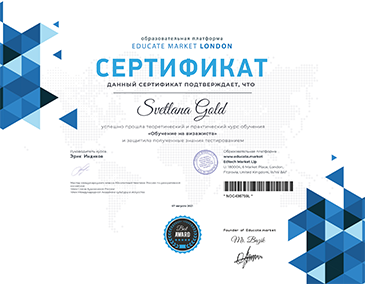
Сертификат educate.market
Часто задаваемые вопросы
I have never done 3D modeling before. Will I be able to do it?
Absolutely YES! The course is designed for beginners. You will be able to achieve results even without any special basic knowledge if you complete the homework and clarify difficult questions with the instructor.
Why should I learn Maya specifically with you?
We provide you with the opportunity to receive high-quality interesting lessons from professionals for an affordable price. On our platform, you can ask the instructor questions while going through the lessons. The service functionality allows you to see the instructor’s desktop or show yours, as well as create video calls.
What software is needed for training? Is the software free?
To work with the course, you need to download Maya from the official website for free for educational purposes.
What is the training schedule for this course?
You will be able to work with the course materials at a convenient time, studying the program at a pace that suits you. All lessons will be available even after the course ends, forever, so you can update your knowledge at any time. You will be able to combine training with work and personal life.
Will I be able to communicate with the instructor?
You will have an instructor in the learning panel of our platform. While going through the lessons, you can ask any question that interests you. The instructor will personally comment on homework and give useful recommendations. There is also the possibility of video calls and screen sharing from our platform! This way you can adopt experience and professional knowledge.
Получить полную консультацию по программе курса
Обучайтесь в educate.market
где хотите и когда хотите
где хотите и когда хотите
Нужен лишь интернет
Когда вам удобно - в дороге или кафе, на отдыхе или в спортзале, дома и на прогулке